
Secret rotation API#
Reportworq stores the credentials it needs to reach your source systems, the passwords, API keys, and tokens for Planning Analytics and TM1, SQL, and the other connectors, along with cloud API keys and mail credentials. When your privileged-access tool rotates one of those credentials at its source, that new value has to reach every system that kept a copy, including Reportworq.
The Secret Rotation API is that path. It is a secure, write-only, audited HTTP endpoint that lets an external secret manager, CyberArk, Delinea Secret Server, BeyondTrust, HashiCorp Vault, or a script of your own, push a new secret value straight into the Reportworq content store, with no administrator re-entering it by hand. Reportworq is the credential consumer here: the tool changes the password at the source, then calls this endpoint to update the stored copy.
The endpoint is off by default. Nothing is exposed until an administrator turns it on and mints a key.
When you would use it#
- A CyberArk (or Delinea, BeyondTrust, Vault) policy rotates a TM1 or SQL service account on a schedule, and you want the Reportworq connection that uses that account to keep working without a manual edit.
- You rotate an OAuth client secret or an API key that Reportworq stores, and you want the update scripted and logged.
- Any case where a password Reportworq holds is managed by an outside system of record, and re-typing it into the UI on every rotation is not acceptable.
Enabling it#
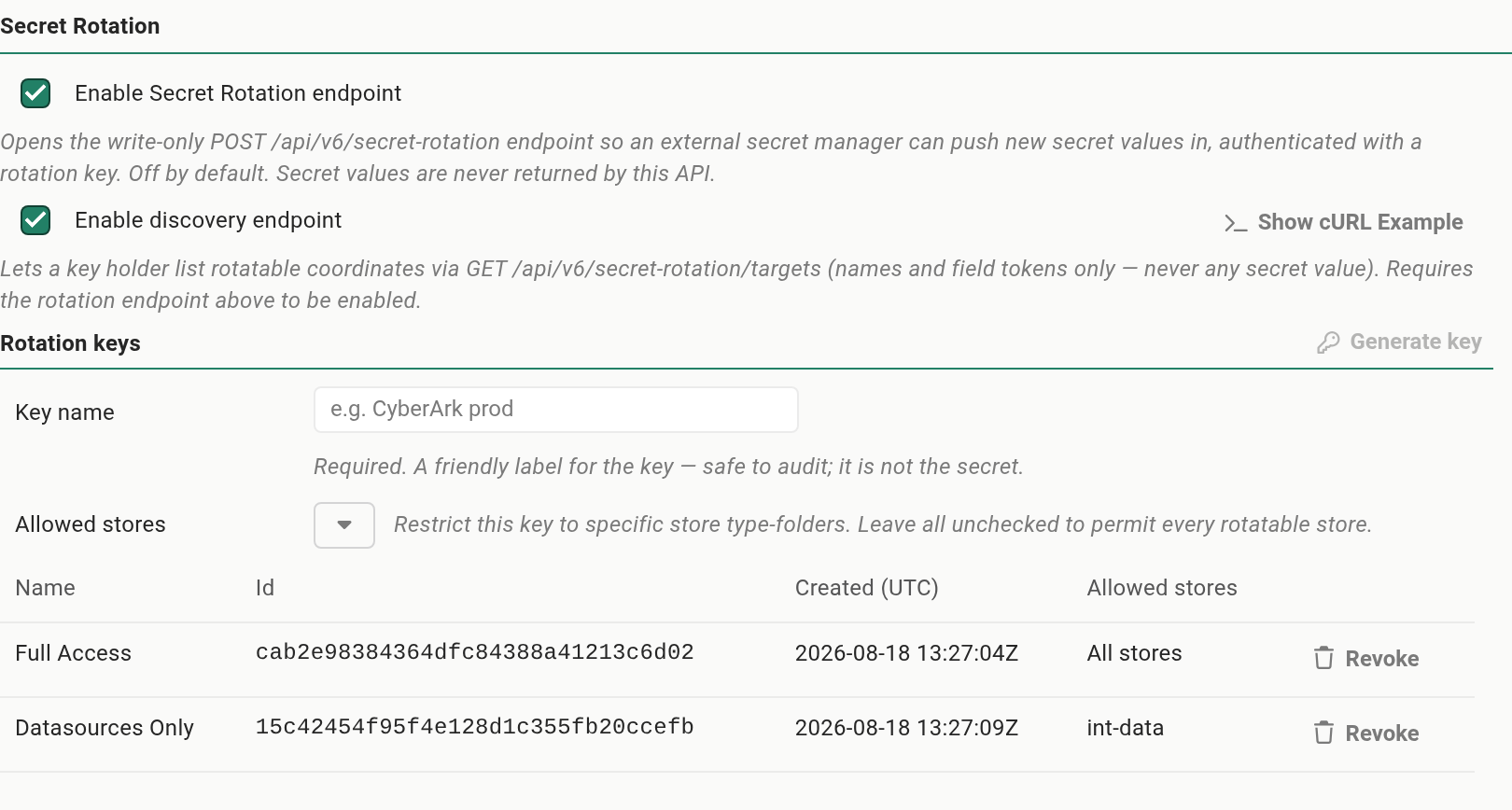
Secret Rotation lives on Settings, Security, Secret Rotation. It is administrator-only, and the endpoints require the REST API entitlement in your Reportworq license (the same entitlement that enables the Local and Cloud APIs).
There are two switches:
- Enable Secret Rotation endpoint turns on the write endpoint (
POST /api/v6/secret-rotation). Off by default. - Enable discovery endpoint turns on the read-only listing (
GET /api/v6/secret-rotation/targets) that a tool can use to map coordinates. Off by default. The discovery switch is subordinate to the endpoint switch: its checkbox is disabled while the endpoint is off, and turning the endpoint off closes discovery too.
Leave discovery off unless a tool needs to auto-map targets. Everything a caller needs is also produced by the Show cURL Example button on each target row (see The Show cURL Example dialog).
Rotation keys#
A rotation key is the credential a caller presents to the endpoint. Keys are managed on the same screen.
- Generate mints a new key from a cryptographic random source and shows you the value once. Copy it then, because Reportworq stores only a salted hash and cannot show it again. If you lose it, revoke it and mint a new one.
- Name each key. A name is required, and it makes the audit trail readable (for example "CyberArk prod"). Generate stays disabled until you enter one.
- Revoke removes a key immediately. A revoked key is rejected on its next call.
- Allowed stores (optional) is a checkbox list of the stores that hold rotatable secrets; tick the ones this key may write, so a key issued to one tool cannot reach every secret in the instance. Leave it empty to allow every rotatable store.
When you generate a key, Reportworq shows the plaintext value once, in a callout right below the form. Copy it before you dismiss the callout: Reportworq keeps only a salted hash, so this is the only time the value is ever shown.

A rotation key is powerful: on its own it can overwrite any stored secret the endpoint can reach. Treat it like any other high-value credential, scope it with an allowlist where you can, and rotate it if you suspect exposure. Every use is audited (see Auditing).
The target coordinate#
Every rotatable secret is addressed by a four-part coordinate. The screen shows it for you, and the discovery endpoint returns it, so you rarely assemble it by hand.
| Part | Meaning |
|---|---|
store |
The store the entity lives in, for example the datasource-connections store. |
workspace |
The owning workspace id, given only for an entity that is stored in a specific workspace. Leave it empty for system-scoped entities. Datasource connections, report providers, AI connections, distributors, and the shared Microsoft 365 and Google credentials are configured once for the whole instance, so they are system-scoped and their workspace is empty, as are the cloud and local API keys and mail settings. The discovery list and the Show cURL Example dialog fill in the right value for you, so you rarely set it by hand. |
id |
The entity id. |
field |
The secret field to set, given as a friendly name such as Password or ApiKey. |
You give the field as a friendly name; Reportworq maps it to the stored field internally. The endpoint will only ever write a field the schema marks as secret, so a caller cannot use it to set arbitrary properties.
Treat a coordinate as stable: once your tool is configured against (store, workspace, id, field), that address does not change under an edit or a re-import. There is one exception, described next.
One retired coordinate#
The old per-workspace Local API token, addressed as local-api/<workspace>/settings/AccessToken, is no longer a rotation target. Local API keys are now managed as a single System-level list, and Reportworq authenticates against those keys instead of the old per-workspace token. It keeps the old file on disk only so that a downgrade still works. The rotation targets table and the discovery endpoint no longer list it, and a rotate call against it now returns 404 with a message that points you to the System Local API key. Before this change the same call returned 200, but it updated a value that nothing used, so your Local API clients kept using the unrotated key.
If an external tool still targets the old coordinate, re-map it:
- Point the tool at the System Local API key. Its
storeislocal-api-keys, itsworkspaceis empty, itsfieldisAccessToken, and itsidis that key's own id. There is one row per key, so take theidfrom the rotation targets table, the discovery endpoint, or the Show cURL Example dialog. - Check the Allowed stores on the rotation key that tool uses. If it lists only
local-api, addlocal-api-keys, or the call returns403. A key with Allowed stores left empty needs no change.
No other coordinate has been retired.
The rotation targets list#
The Secret Rotation screen scans the content store and lists every rotatable secret, so you do not have to know what is stored where. The list is grouped System first, then one section per workspace for any entity that is stored in a specific workspace, with one row per secret field, showing its display name, store, and (for workspace entities) the instance id and the field. It covers everything Reportworq keeps a credential for: the Cloud and Local API keys, mail and OAuth settings, the shared Microsoft 365 and Google credentials, and the data source connections (Planning Analytics and TM1, SQL, and the rest), AI model connections, and distributors, each shown by its own display name and instance. These integration connections and shared credentials are configured once for the whole instance, so they are system-scoped and appear under System, not under a workspace.
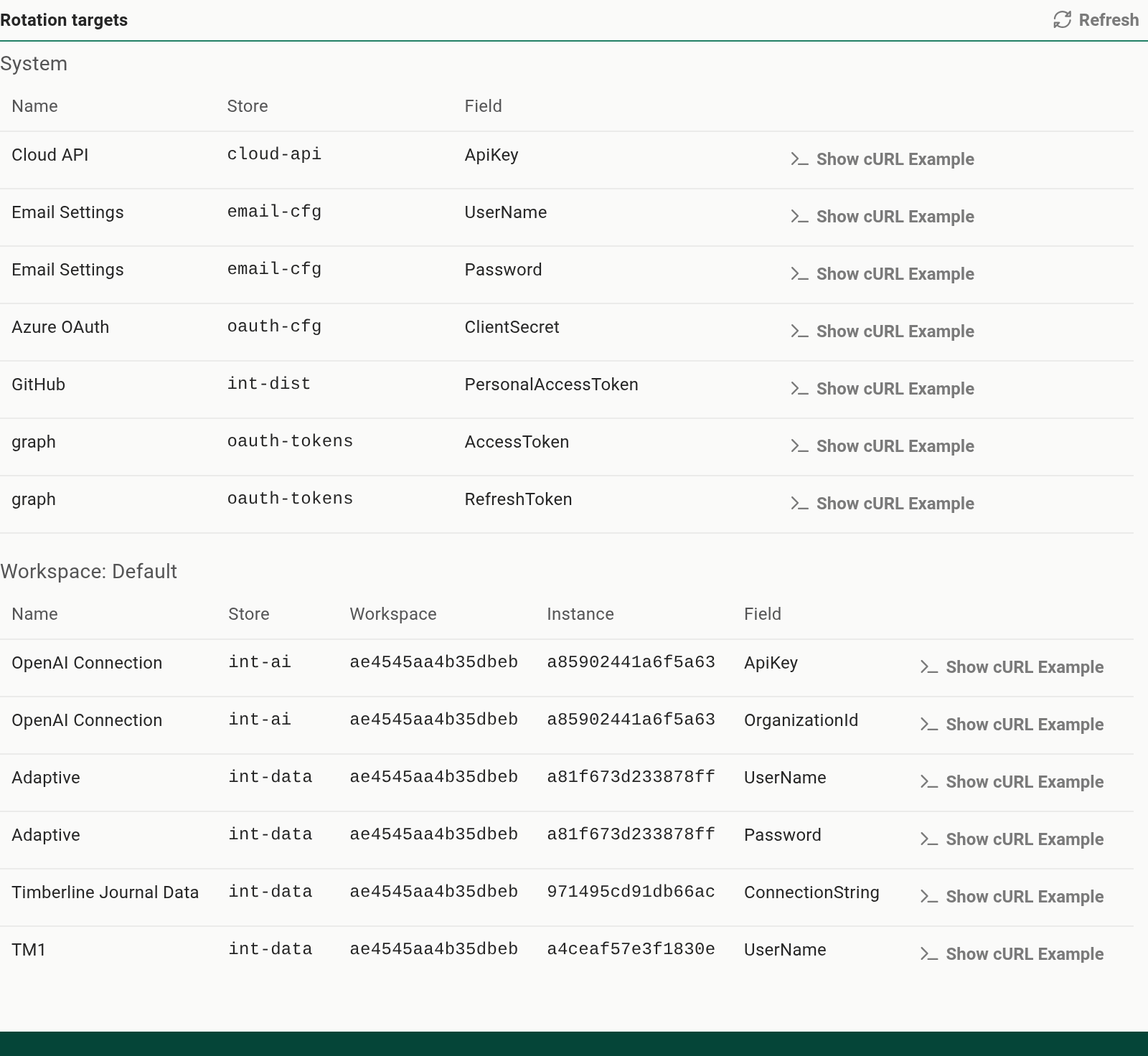
The list loads the first time you open the Secret Rotation tab in a session, and it is then reused rather than re-scanned on every visit, so reopening the tab stays fast. Because of that, it will not pick up a secret that was added or changed elsewhere in the meantime, for example a new data source connection. Click Refresh above the table whenever you want to be sure you are looking at the current list.
No secret value is ever shown, only where each secret lives.
One target signs everyone out. Each installation generates its own key for signing session tokens, and it appears in the list like any other secret (it belongs to the authentication settings). Rotating it takes effect immediately, with no restart, and every signed-in user is signed out at once and must sign in again. Rotate it deliberately, outside working hours. A replacement value must be at least 32 bytes long; a shorter one cannot sign sessions, and Reportworq replaces it with a generated key.
The endpoints#
Rotate a secret (write)#
POST /api/v6/secret-rotation
Present the rotation key in the X-Reportworq-Rotation-Key header, or in the JSON body's apiKey field, whichever your tool finds easier. Never put the key in the URL query string. The request must be over HTTPS.
Request body:
{
  "store": "the-store",
  "workspace": "the-workspace-id",
  "id": "the-entity-id",
  "field": "Password",
  "value": "the-new-secret",
  "apiKey": "optional, if not sent as a header"
}
Send workspace empty (or omit it) for a system-scoped target, which includes every datasource connection, report provider, AI connection, distributor, and shared credential, along with the cloud and local API keys and mail settings. Set it only when the discovery list or the Show cURL Example dialog shows a workspace id for the target.
Responses:
| Status | Meaning |
|---|---|
200 |
Updated. The body echoes the coordinate and a savedAtUtc, never the value. |
400 |
The request was malformed, or the rotation could not be applied to that coordinate. |
401 |
The rotation key was missing or invalid. |
403 |
The endpoint is disabled, or the key is not permitted for that store. |
404 |
The coordinate does not resolve, or the field is not a rotatable secret. This includes the retired per-workspace Local API token (see One retired coordinate). |
The endpoint is write-only. It never returns, echoes, or logs the old or new secret value.
Discover rotatable targets (read)#
GET /api/v6/secret-rotation/targets
Available only when both the write endpoint and the discovery switch are on, because discovery is subordinate to the master switch, so turning the write endpoint off closes discovery too. It returns the list of rotatable coordinates the presenting key is allowed to reach, each with its store, workspace, id, display name, and the friendly secret field, and never any value. A tool uses this to map its targets once and then run unattended.
The Show cURL Example dialog#
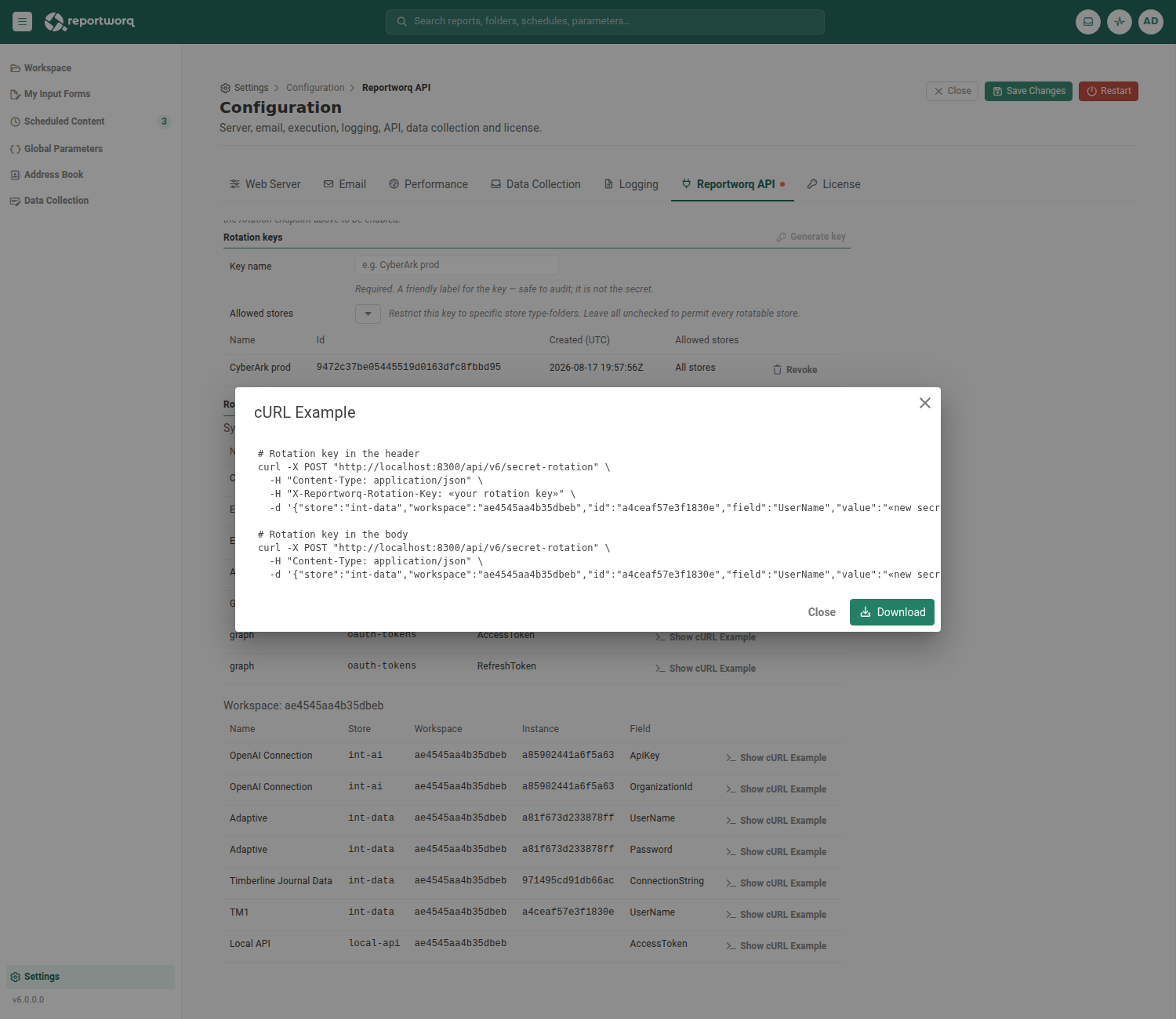
You do not have to assemble a call by hand. Every row in the rotation-targets list has a Show cURL Example button, and the discovery row has one too. It opens a dialog with a ready-to-run curl example, filled in from that coordinate, in both forms, one with the rotation key in the header and one with it in the body. Beneath the two curl variants the dialog also shows the request body on its own as pretty-printed JSON (with the apiKey field included), so you can read the shape at a glance or paste it straight into a REST client such as Insomnia or Postman. Only the rotation key and the new value are left as placeholders; copy whichever form your tool prefers.
Wiring it into CyberArk#
CyberArk's modern integration path is the REST API application CPM plugin framework, which drives a config-defined HTTP request chain. Reportworq is a usage / dependency target: CyberArk rotates the master account at its source, then this endpoint updates Reportworq's stored copy. Map the framework's change request to the Reportworq call:
- Method and URL:
POST https://your-reportworq-host/api/v6/secret-rotation - Header:
X-Reportworq-Rotation-Key: <the rotation key you minted> - Body: the JSON above, with the framework's new-password placeholder in
value, for example"value": "{{password}}", and the fixedstore,workspace,id, andfieldfor the target you took from the request builder or the discovery endpoint. - Success: treat HTTP 200 as success. No response parsing is required.
The same shape works for Delinea Secret Server (a dependency or remote-password changer), BeyondTrust, and HashiCorp Vault: point the tool's post-rotation hook at the same POST, with the key in the header and the coordinate and new value in the body.
Auditing#
Every call, success or failure, writes one entry to the System Log (category Security), recording the outcome, the key's name and id, the caller's IP, and the target coordinate. It never records the secret value. A rejected key and a failed write are logged as warnings so they stand out. Review these on Settings, Auditing, see Audit logs.
Feedback on this page
Comments, questions, requests, or something missing or unclear? Email us - the page you are on is filled in for you.
Email feedback on this pageOr write to support@reportworq.com directly.