
Direct OAuth sign-in for MCP clients#
With direct OAuth sign-in, an AI client connects straight to your Reportworq MCP server URL (for example
https://reports.contoso.com/mcp) and acts as the person using it. That person signs in with your
organization's own identity provider, and every answer is limited to what their Reportworq access allows.
There is no API key to hand out, store, or rotate.
How it works#
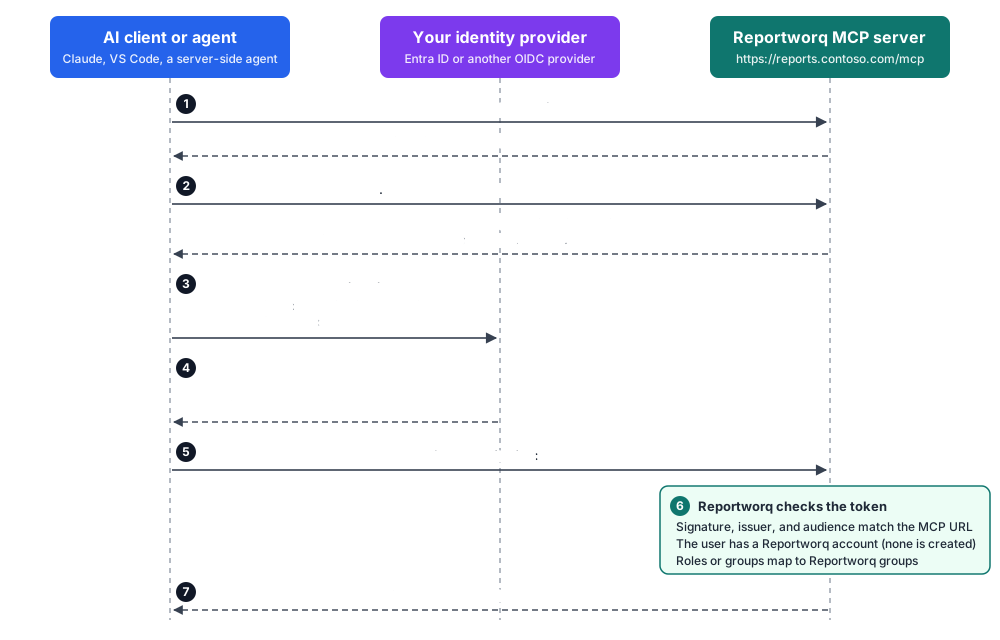
- The client discovers how to sign in. Its first call without a token gets a 401 that points to
Reportworq's protected resource metadata at
/.well-known/oauth-protected-resource/mcp. That document names the MCP server URL as the resource, your identity provider as the place to sign in, and, with Microsoft Entra ID, the scope to request:<MCP server URL>/access_as_user. - The user signs in with your identity provider, Microsoft Entra ID or another OIDC provider such as Okta
or Keycloak. How depends on the client:
- Interactive clients (Claude Desktop, Claude Code, claude.ai, VS Code, Cursor, Cline) open a browser and use the authorization code flow with PKCE.
- A server-side agent that your users already sign in to calls on their behalf: it exchanges the user's token for one scoped to Reportworq (the Entra on-behalf-of flow), so the user never signs in twice.
- The token is issued for your MCP server URL. Its audience is that URL, and Reportworq refuses any token whose signature, issuer, or audience doesn't match.
- Reportworq maps the token to a person. The token's email and user id must match an existing Reportworq account. The MCP path never creates accounts, so each user must have signed in to Reportworq once (or been added by an administrator).
- Roles decide what the agent can see. Entra app roles or group claims in the token map to Reportworq groups, exactly as they do when the person signs in to the portal. Tools and results are trimmed to that person's permissions, and each call is recorded under their name in the MCP audit.
Before you begin#
- An OIDC single sign-on provider is the active provider under Authentication (see Authentication providers), and it uses your own app registration, not the shared Reportworq multi-tenant Entra application. Google sign-in can't be used.
- The MCP endpoint has a public https address at the root of its host, such as
https://reports.contoso.com/mcp. With Microsoft Entra ID, the host must be a domain verified in your tenant. For Claude, which connects from Anthropic's cloud, it must also be reachable from the internet. - Three people usually share the work: a Reportworq administrator, an identity-provider (Entra) administrator, and whoever sets up the AI client or agent.
Set up Reportworq (Reportworq administrator)#
Open Settings ▸ Configuration. Under Web Server, set External URL to the public https address of the server with no path, for example
https://reports.contoso.com, and save.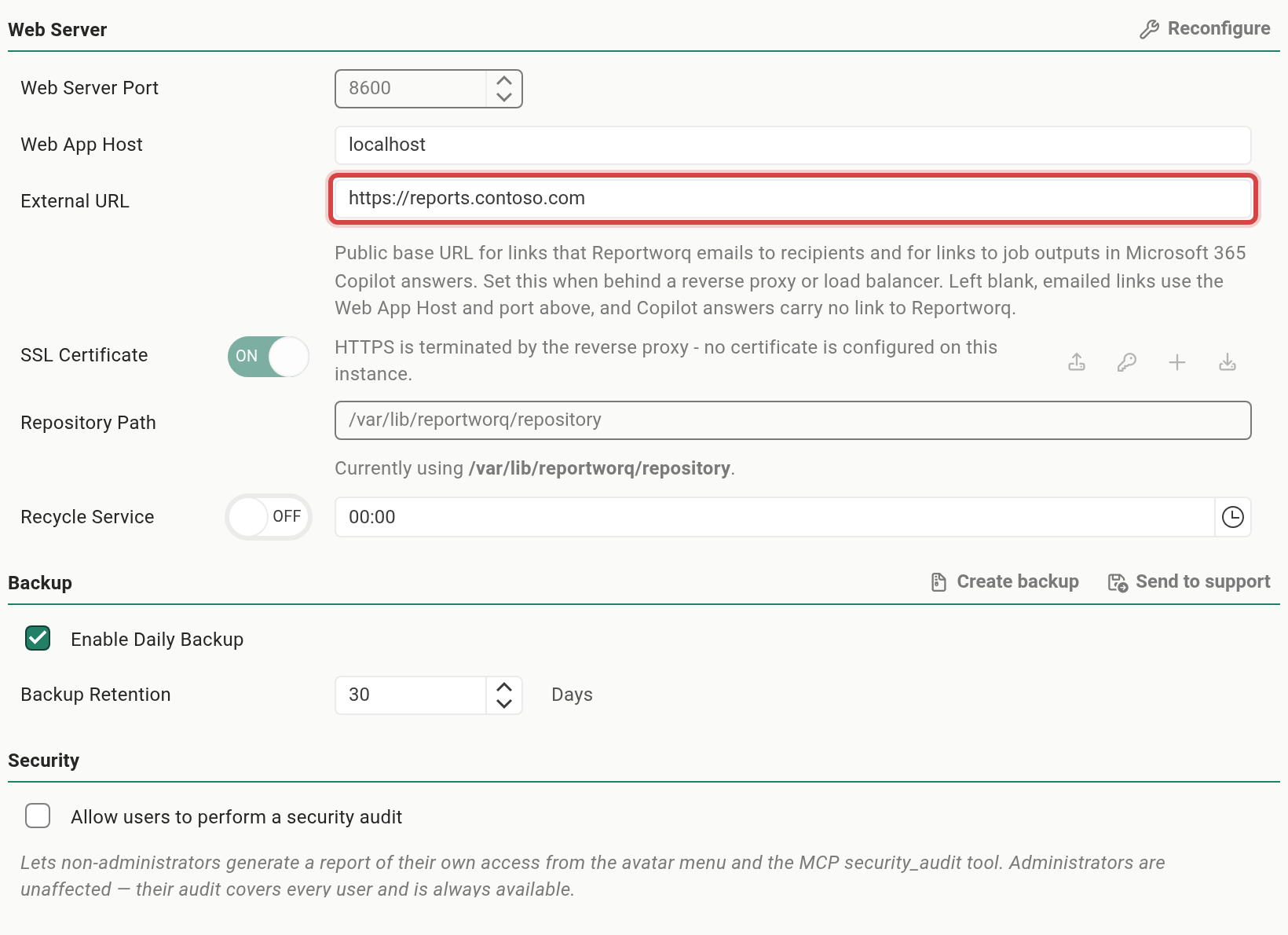
The External URL field in the Web Server group of Settings > ConfigurationTap or click the image to view it full screen Open Settings ▸ Integrations ▸ AI Agent Access (MCP).
Under Access, set Access Mode to OAuth.
Under Channels, turn on Direct URL. Turn off CloudHub relay unless you also use Microsoft 365 Copilot through CloudHub: while the relay is on with no Cloud API configured, the page won't save. The Direct OAuth sign-in section appears.
Under MCP server URL, select Use https://reports.contoso.com/mcp (your External URL plus
/mcp), or type the URL. Reportworq never fills this in on its own: it only accepts sign-ins for a URL an administrator has saved here.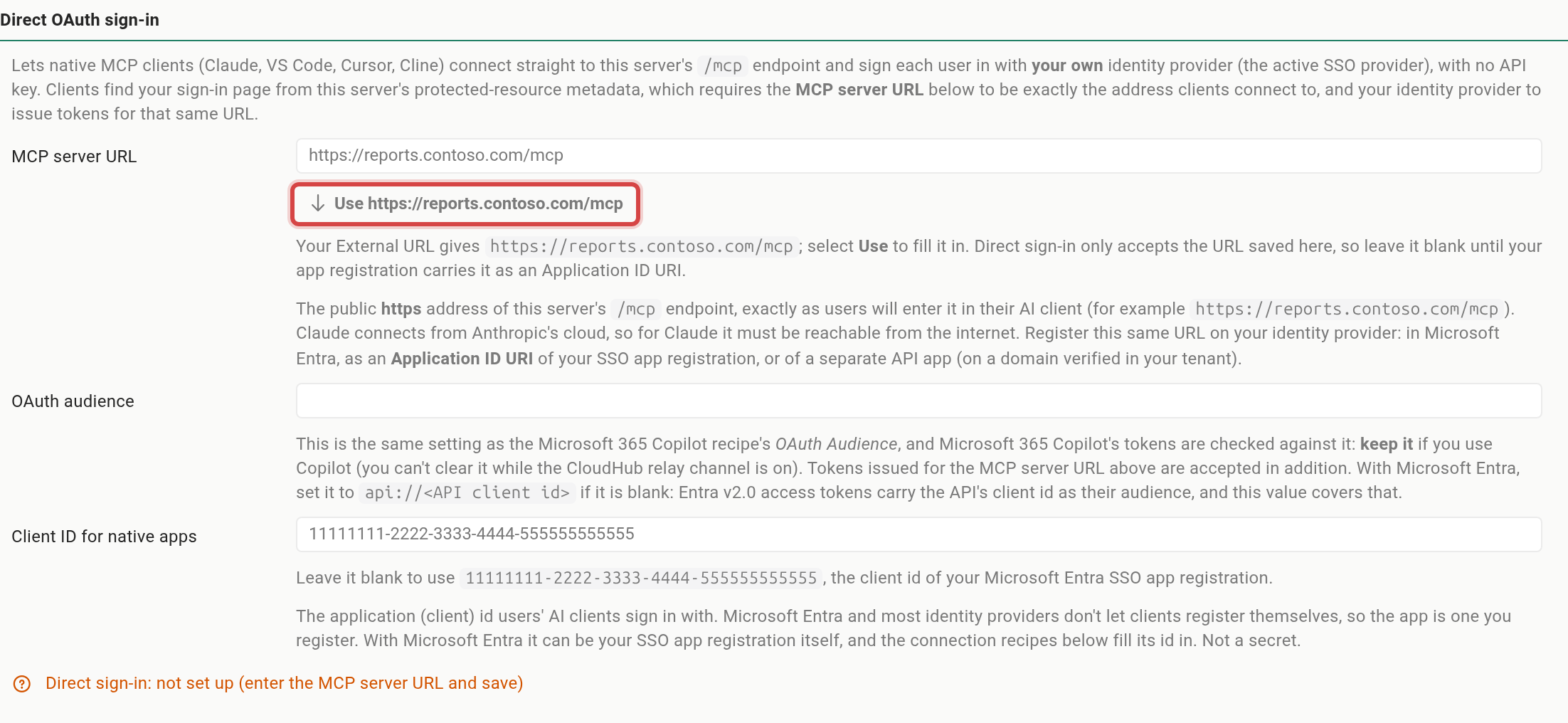
The Direct OAuth sign-in section with an empty MCP server URL and the Use button that offers the External URL plus /mcpTap or click the image to view it full screen Leave OAuth audience as it is. Leave Client ID for native apps blank to use your Entra sign-in app's client id (the field shows it), or enter the id of a separate app you registered for AI clients.
Select Save Changes. The status line reads Direct sign-in advertised for your URL.
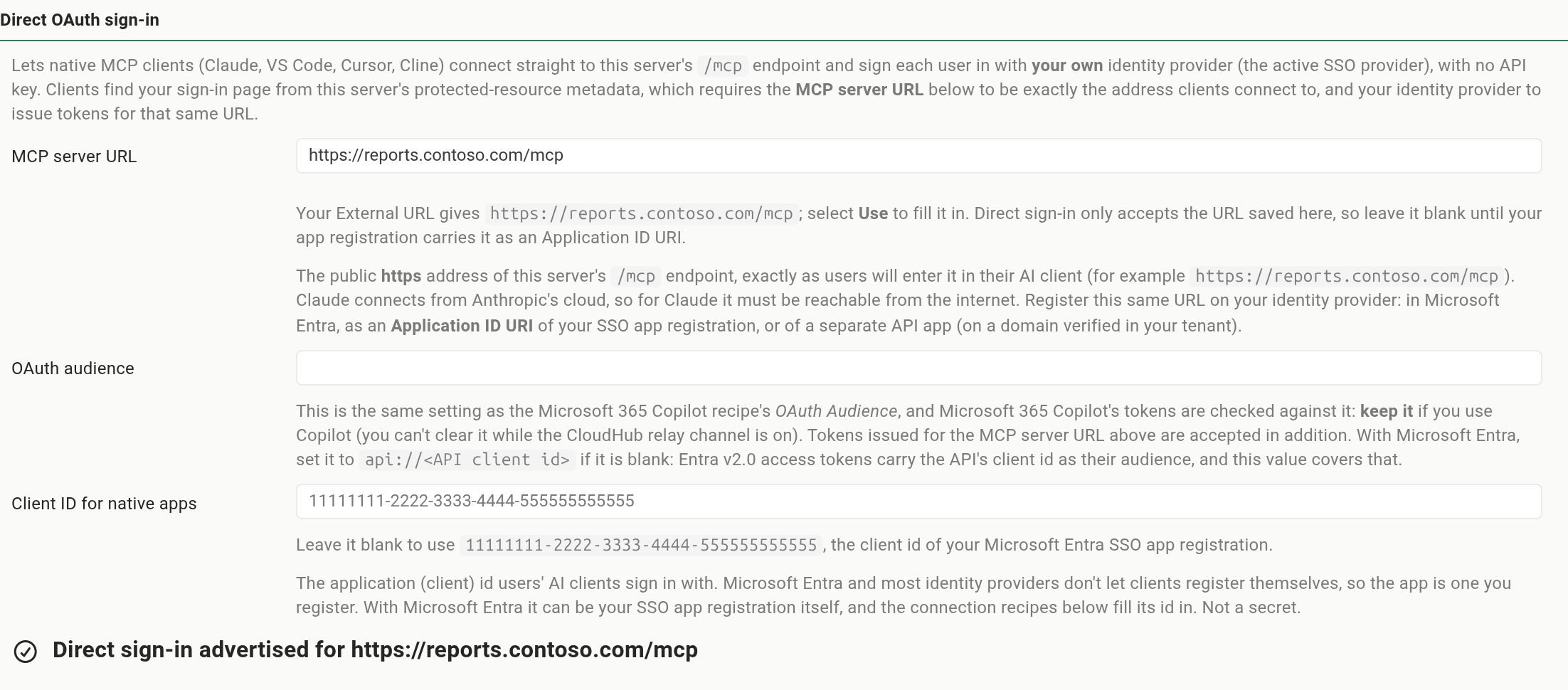
The saved Direct OAuth sign-in section, with the status Direct sign-in advertised for https://reports.contoso.com/mcpTap or click the image to view it full screen Any other status names the missing piece, for example an OIDC provider that isn't active yet.
The collapsible Direct OAuth: identity provider checklist below the section repeats the next steps with your URL filled in, so you can pass it to your Entra administrator.
Set up Microsoft Entra ID (Entra administrator)#
Work on the app registration Reportworq already signs in with (its SSO app). In the Microsoft Entra admin center:
- Expose an API ▸ Application ID URI. Add the MCP server URL, for example
https://reports.contoso.com/mcp, exactly as saved in Reportworq. Keep anyapi://URI that is already there. The host must be a domain verified in your tenant. - Expose an API ▸ Add a scope. Add a delegated scope named
access_as_user. Clients then requesthttps://reports.contoso.com/mcp/access_as_user. - For interactive clients: under Authentication, add the redirect URIs of the clients you use, and for VS Code authorize its client id. The full list is in Configure your identity provider.
- For a server-side agent: on the agent's own app registration, add the API permission
access_as_useron the SSO app and grant admin consent, so no user is prompted. Optionally also add the agent's client id under Expose an API ▸ Authorized client applications. - Assign access. Under Enterprise applications for the SSO app, assign app roles or groups to the users, and map those roles or groups to Reportworq groups (see Authentication providers).
With another OIDC provider, make access tokens for this API carry the MCP server URL as their audience and register a public client for the AI clients; see Other identity providers.
Connect the client or agent#
Interactive clients. In AI Agent Access (MCP), expand Connect: MCP clients, pick the client, and keep the Direct connection type. The recipe carries the MCP server URL and client id. Per-client steps are in Connect each client.
A server-side agent. Call the MCP server URL over Streamable HTTP and send each user's own token as
Authorization: Bearer <token>. Get that token with the Entra on-behalf-of request tohttps://login.microsoftonline.com/<tenant id>/oauth2/v2.0/token:Parameter Value grant_typeurn:ietf:params:oauth:grant-type:jwt-bearerrequested_token_useon_behalf_ofassertionThe token the user signed in to your agent with scopehttps://reports.contoso.com/mcp/access_as_userclient_id,client_secretYour agent's app registration and its secret (or certificate) Renew the token before it expires; Reportworq refuses an expired one.
Check it works#
- Open
https://reports.contoso.com/.well-known/oauth-protected-resource/mcpin a browser. Theresourcevalue must be exactly your MCP server URL, and with Entrascopes_supportedlistshttps://reports.contoso.com/mcp/access_as_user. - Connect a client as a test user and ask which distribution jobs it can see. The list should match what that user sees in the portal.
Troubleshooting#
| Symptom | Cause and fix |
|---|---|
401 invalid_token |
The token's audience or scope is wrong. Request <MCP server URL>/access_as_user, and check that the MCP server URL is an Application ID URI of the SSO app. |
| 401 "No Reportworq account is provisioned for this user." | The user has never signed in to Reportworq. Have them sign in to the portal once, or add the account. |
| 401 "User has no accessible Reportworq workspaces." | The user has no role or group that grants a workspace. Assign an app role or group in Entra that maps to a Reportworq group. |
| The client never offers a sign-in, or rejects the server's metadata | The URL doesn't match. It must be identical, with no trailing slash, in three places: the MCP server URL in Reportworq, the Application ID URI in Entra, and the URL the client connects to. |
| Status reads "Direct sign-in: not set up" | No MCP server URL is saved. Select Use or type the URL, then Save Changes. |
| The Direct OAuth sign-in fields are disabled | The instance uses the shared Reportworq multi-tenant Entra application. Switch the Microsoft 365 Copilot recipe to your own app registration. |
Related pages#
- The MCP shim for desktop AI clients: per-client redirect URIs, connection steps, and limits of direct sign-in.
- Copilot, MCP, and trust paths: how direct and CloudHub-relayed access differ.
- MCP audit: what each agent call records.
Feedback on this page
Comments, questions, requests, or something missing or unclear? Email us - the page you are on is filled in for you.
Email feedback on this pageOr write to support@reportworq.com directly.