
Overview#
Reportworq supports a connection to Pigment. Pigment is a modern business planning platform designed to replace traditional spreadsheet-based forecasting with a centralized, real-time environment.
Datasource Configuration#
Reportworq Administrators can add and configure a Pigment Datasource to facilitate automated data refreshes and distribution.
To add and configure a Pigment Datasource:
- In the Reportworq Administration interface, select the add icon (+) beside the Datasources heading.
- Select Pigment from the available source types.
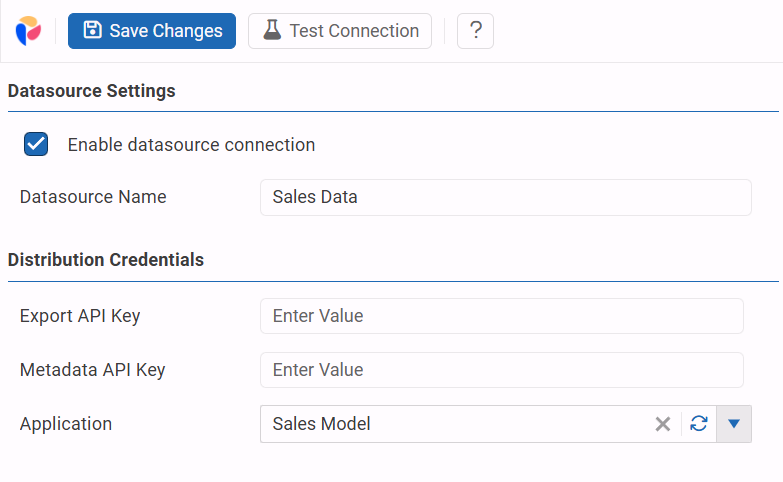
- In the Datasource Settings area, configure the following:
- Enable datasource connection: Check this box to make the connection active.
- Datasource Name: Provide a unique, meaningful name (e.g., "Pigment Production").
- In the Distribution Credentials area, provide the following keys generated within your Pigment security settings:
- Export API Key: Enter the key used for data export operations.
- Metadata API Key: Enter the key used for retrieving Pigment structure and dimension information.
- Specific details on the API keys can be found here https://kb.pigment.com/docs/manage-api-keys
- Application: Enter the specific Pigment Application name or ID associated with this connection. Use the Refresh icon to validate or update the application list if applicable.
- Select Test Connection at the top of the pane to verify that Reportworq can communicate with Pigment using the provided credentials.
- Select Save Changes to apply the settings.
Feedback on this page
Comments, questions, requests, or something missing or unclear? Email us - the page you are on is filled in for you.
Email feedback on this pageOr write to support@reportworq.com directly.