
Configuration#
The ability to distribute files to SharePoint from Reportworq is achieved through the use of stored SharePoint login credentials. The user name (version dependent) and password are the credentials required to authenticate to the SharePoint server to post files to SharePoint libraries. When job distribution is configured, specify the path to the SharePoint Library where reports should be distributed. The login credentials specified here must have permission to create/delete/update files in the SharePoint libraries where Reportworq should distribute files. SharePoint credentials are automatically encrypted by Reportworq.
The Location URL on the job and recipient screens needs to be in the following form:
https://myofficeserver.sharepoint.com/sites/mysite/myfolder1/myfolder2

SharePoint 365 Modern Authentication#
- Reportworq administrators can open the Administration screen from the Administration button on the top right side of the page and SharePoint Settings.
- To Authenticate with Office 365 SharePoint, follow the steps in the Azure App Registration article.
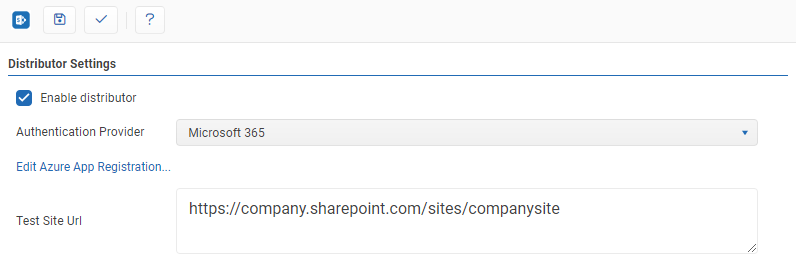
- Test Site URL: A valid SharePoint URL that can be used to test connectivity.
- Test: Clicking the '✓' button will either display a success message or show error messages with further information on missing or misconfigured settings.
- Save: the 'Save' button saves changes made to the distributor settings.
- The SharePoint Distributor can be enabled or disabled by clicking the checkbox.
SharePoint 365 Basic Authentication#
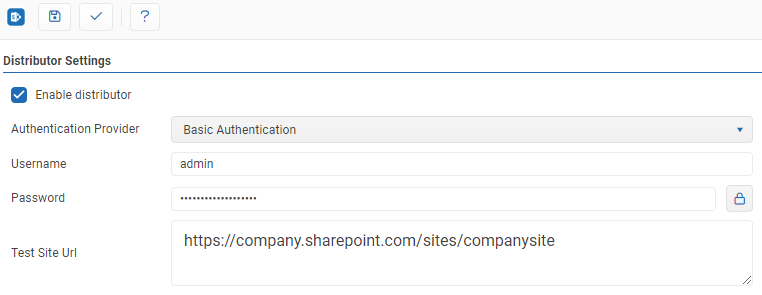
- Username: The email address of the account to authenticate when distributing content. Multi-Factor Authentication (MFA) cannot be enabled for the account.
- Password: The password for the account used above.
- Test Site URL: A valid SharePoint URL that can be used to test connectivity.
- Test: Clicking the '✓' button will either display a success message or show error messages with further information on missing or misconfigured settings.
- Save: the 'Save' button saves changes made to the distributor settings.
The SharePoint Distributor can be enabled or disabled by clicking the checkbox.
SharePoint 2013 and earlier#
- Username: The username of the account to authenticate as when distributing content in the form of domain\username. (Alternatively, if a domain is not required to connect just specifying the user name is valid.)
- Password: The password for the account used above.
- Test Site URL: A valid SharePoint URL that can be used to test connectivity.
- Test: Clicking the '✓' button will either display a success message or show error messages with further information on missing or misconfigured settings.
- Save: the 'Save' button saves changes made to the distributor settings.
- The SharePoint Distributor can be enabled or disabled by clicking the checkbox.
Feedback on this page
Comments, questions, requests, or something missing or unclear? Email us - the page you are on is filled in for you.
Email feedback on this pageOr write to support@reportworq.com directly.