
Reportworq offers multiple ways of disseminating information to targeted recipients, and these methods are defined as Distributors. Distributors provide an efficient and repeatable means of disseminating reports, ensuring that recipients receive their reports the most convenient way.
Distributors are configured by Reportworq administrators in the Distributors section on the Administration page, which is accessible through the Administration icon on the top right in Reportworq:

Select the Distributor to be configured:
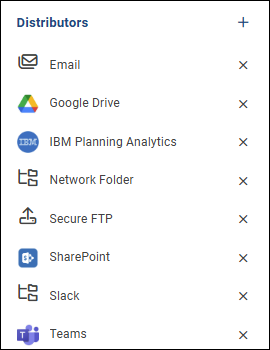
The available Distributor options are:
- Email: Basic Authentication (SMTP), Office 365 SMTP setup, and SendGrid API are configured here.
- Google Drive: Google Drive can be configured on this screen after creating an API Service Account for Reportworq.
- IBM Planning Analytics: Distributes output to TM1 Application Folders.
- Network Folder: A network folder location can be configured on this screen.
- Secure FTP: This distribution method delivers output files to a remote folder via SFTP.
- SharePoint: This distribution method can be configured using stored SharePoint login credentials.
- Slack: A Slack Channel can be configured here, after creating an app in your Slack instance.
- Teams: Teams distribution is configured on this screen. It is recommended that a Microsoft 365 service account for Teams Distribution.
Managing Distributors#
All Distributors can be disabled as needed. If a distributor has been disabled, any jobs using that distribution method will fail, and any jobs using other enabled distributors will run as expected.
Feedback on this page
Comments, questions, requests, or something missing or unclear? Email us - the page you are on is filled in for you.
Email feedback on this pageOr write to support@reportworq.com directly.