
Secure FTP Server#
You can configure a Reportworq Distributor to deliver output files securely to a remote folder via SFTP server.
Before you add the Secure FTP Distributor, you must set up a user account on the SFTP server. The user account must have SFTP enabled and have full permisions for a dedicated folder where Reportworq can create subfolders and deliver output files.
To configure a Secure FTP Distributor:
- In the Reportworq Administration interface, select the add icon
 beside the Distributors heading. The New Report Distributor pane appears: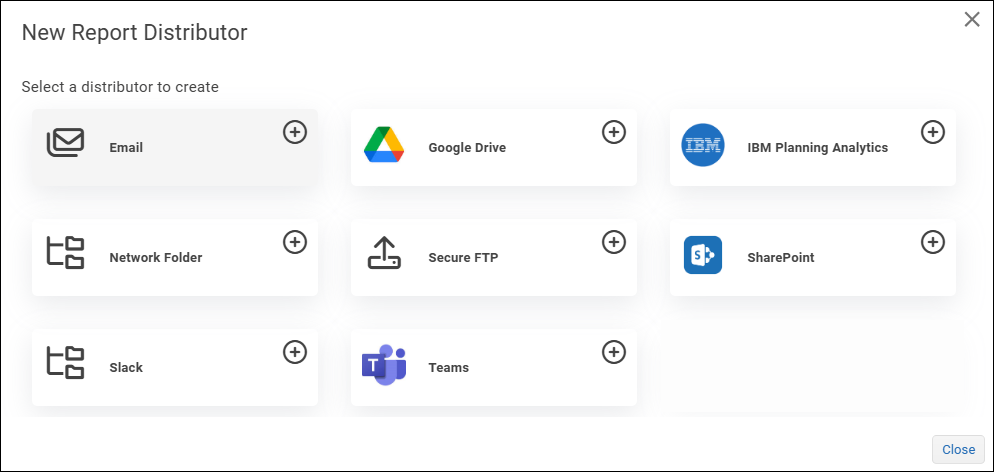
- Select Secure FTP.
 The Distributor Settings dialog appears.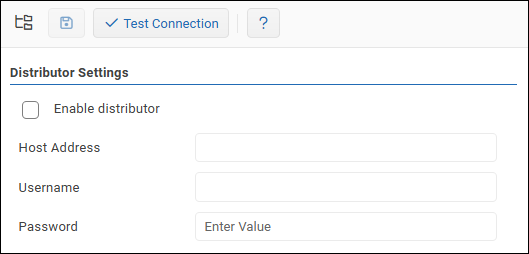
- Specify the following:
- Host Address -- The IP address of the SFTP server.
- Username -- The username for the SFTP user account.
- Password -- The password for the SFTP user account.
- To confirm that the settings are properly configured, select Test Connection.
 If the test fails, edit the settings as required and then test again.
 - Select the Enable distributor checkbox.
- Select the Save icon
 to save and apply the settings.
Feedback on this page
Comments, questions, requests, or something missing or unclear? Email us - the page you are on is filled in for you.
Email feedback on this pageOr write to support@reportworq.com directly.