
Overview#
Reportworq offers a built-in Drive. The Reportworq Drive option allows users to store files and folders in the related Source Report Connection folder. Disabling a built-in provider will not delete the files, but simply no longer list it in the report selector dialog. Through the Source Report Selection dialog users can now add, create, rename, and delete files and folders. Any type of file can be uploaded to the built-in provider. However, only valid source report files will be enabled or selectable in a job.
Configuration#
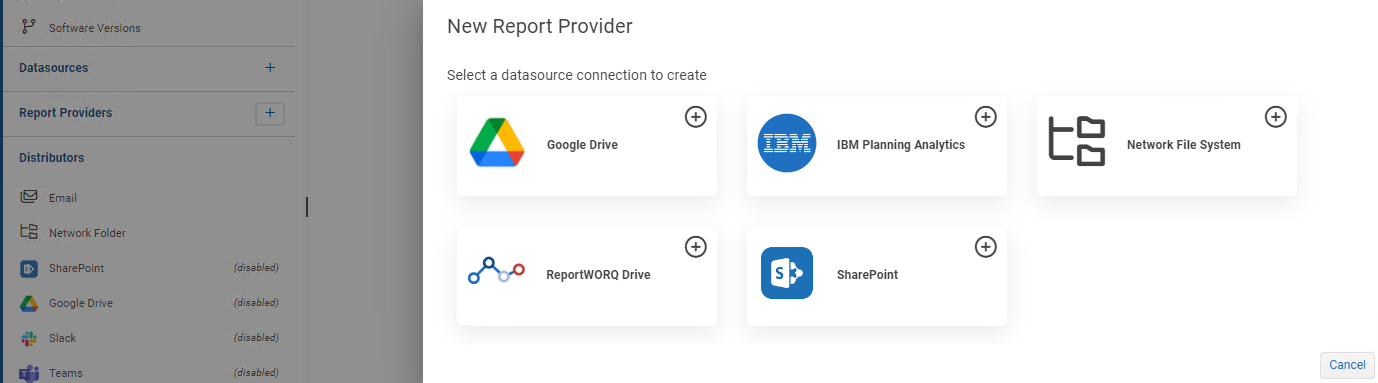
To add a Reportworq Drive Report Provider to the list of available providers, Reportworq administrators open the Administration screen then click the '+' button beside Report Providers, and select the Reportworq Drive option:
Open the newly created provider to configure it:
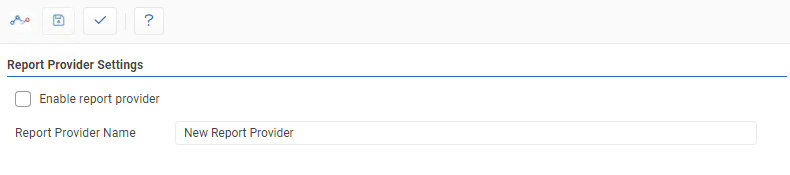
- Name: This is a friendly name that describes the Report Provider and will be visible to all users of the Reportworq application when browsing for source files. The name must be unique across all defined Report Providers.
- Test: Clicking the '✓' button will either display a success message or show error messages with further information on missing or misconfigured settings.
- Save: the 'Save' button saves changes made to the provider.
The Reportworq Drive Report Provider can be enabled or disabled by clicking the checkbox.
Using Reportworq#
To add a file to the Reportworq Drive folder from the Edit Jobs screen select 'Add a Report' and then click the Reportworq Drive 'Upload Files...' button. From this screen, users can upload, rename, or delete Reportworq Drive files.
Feedback on this page
Comments, questions, requests, or something missing or unclear? Email us - the page you are on is filled in for you.
Email feedback on this pageOr write to support@reportworq.com directly.